
What is the Best Free AI Background Remover? Top 5 Tools for 2025
In today’s digital landscape, a clean, professional image can transform your content’s impact. AI background removers simplify this process, delivering polished results without the need for complex software like Photoshop. With countless options available, which tool stands out? Dreamface Background Remover leads with its powerful AI, unlimited free usage, and intuitive design. Below are the top five free AI background removers for 2025, with Dreamface as the clear frontrunner.
The 5 Best Free AI Background Removers in 2025
1. Dreamface: Best Overall Free Background Remover
Dreamface excels by blending precision, affordability, and ease, making it ideal for e-commerce sellers, social media creators, and marketers seeking professional results.
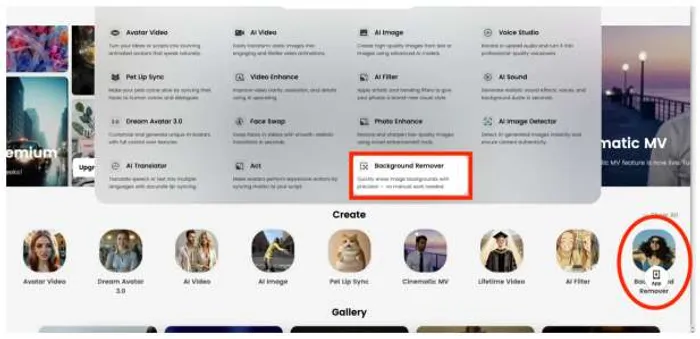
Key Features:
- Free & Unlimited: Process unlimited images without restrictions or paywalls, unlike most competitors.
- Pixel-Perfect AI: Removes backgrounds with precision, handling complex edges like hair and fur without artifacts.
- Versatile Customization: Replace backgrounds with colors or images and enhance with brightness, contrast, and sharpness tools.
- One-Click Simplicity: No account needed; upload and remove backgrounds in seconds.
Best for: High-volume users needing quality and flexibility. A user raved, “Dreamface made my product photos look pro in seconds—completely free!”
2. Erase.bg
Erase.bg is a reliable, no-frills option with unlimited free usage, focusing on straightforward background removal.
Key Features:
- Unlimited free processing.
- Fast, simple interface.
- Solid accuracy for everyday subjects.
Lacks: Advanced customization or enhancement tools.
Best for: Users needing basic, free background removal.
3. Pixlr
Pixlr’s background remover is part of its online editing suite, offering decent results but limiting free high-resolution exports.
Key Features:
- Integrated with Pixlr’s editing tools.
- Effective for quick background removal.
- Supports basic enhancements.
Lacks: Unlimited free high-resolution downloads; less precise for complex edges.
Best for: Pixlr users needing occasional edits.
4. PhotoRoom
PhotoRoom specializes in e-commerce, delivering clean background removal for product images, though free high-resolution exports are limited.
Key Features:
- Precise cutouts for product photos.
- User-friendly interface for quick edits.
- E-commerce-focused templates.
Lacks: Unlimited free high-resolution outputs; advanced customization.
Best for: Small businesses with product images.
5. Cutout.pro
Cutout.pro offers AI-driven background removal with a focus on speed, but its free plan restricts high-resolution downloads.
Key Features:
- Effective for simple background removal.
- Supports batch processing in paid plans.
- Online accessibility.
Lacks: Unlimited free access; less seamless for intricate images.
Best for: Users needing occasional background removal.
Why Dreamface is the Best Choice in 2025
Dreamface combines Erase.bg’s unlimited free usage, PhotoRoom’s precision, and versatile editing tools in a seamless, one-click interface. Unlike Pixlr’s export limits or Cutout.pro’s restricted free plan, Dreamface delivers professional-grade results without compromise, perfect for any scenario—e-commerce, social media, or photography. A user noted, “It’s so easy, and my images look flawless!”
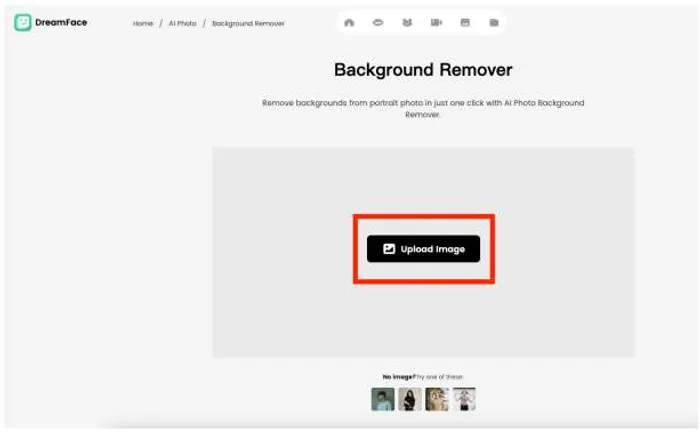
How to Remove a Background with Dreamface in 3 Steps
1.Upload Image: Select a JPG or PNG file.
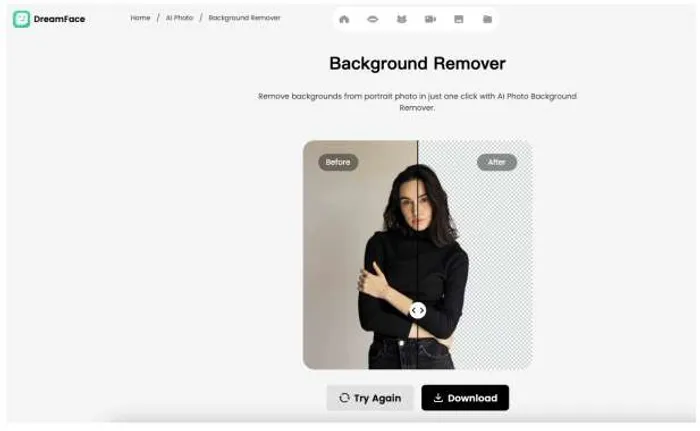
2.AI Processing: The AI removes the background in seconds with high precision.
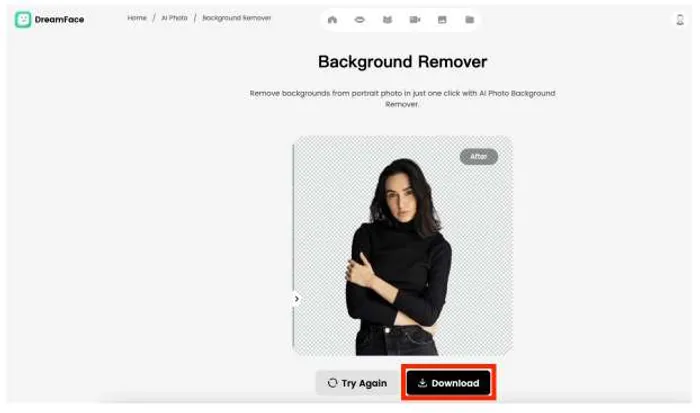
3.Download & Customize: Save your high-resolution PNG or customize further.
Conclusion
AI background removers have made professional editing accessible to all. While Pixlr, PhotoRoom, and Cutout.pro offer solid options, and Erase.bg provides free simplicity, Dreamface Background Remover leads in 2025 with unlimited free usage, flawless AI precision, and creative flexibility. Try it today to elevate your visuals!

Stay ahead of the market.
Get curated U.S. market news, insights and key dates delivered to your inbox.






Comments
No comments yet